Projects
If you wish to apply for a project which will have resources allocated at HPC2N, the Principal Investigator (PI) has to apply for one according to the rules described on the NAISS allocations web page.
NEW
Just like at NAISS resources, there is now only ONE type of project. The compute and storage rounds have been merged into one.
If you are applying for a project at a NAISS centre, there are three different sizes of projects you can apply for: small, medium, and large. You apply for all of them on the NAISS SUPR page, under rounds. To do so you need an account at SUPR.
HPC2N’s resource Kebnekaise is a local resource, so to apply for that pick “Local and Special Rounds” in SUPR.
When you start a project application, the progress will be saved as ‘In Preparation’ on your SUPR page, and you can continue working on it later. Just remember to save the changes you make to each of the sections!
Note
When applying for resources at HPC2N, be aware that the following are considered separate resources and needs to applied for separately:
- Largemem nodes
- CPU nodes
- GPU nodes
Projects (Compute+storage)
Note
Compute and storage projects are merged for 2026!
You will need to fill in more information for the larger projects, than for the smaller ones. However, there is some information you will need regardless of the type of project: Title, Abstract, Resource Usage (how do you plan to use the requested resources), Classification (VR classification codes - only in Swedish), length of project (1-12 months), which resource(s) you wish to use, and the amount of core hours/month you need.
Much of the information on the application will be filled in, but you should check that your contact information and such is correct.
Note
To apply for a project, you need to be the PI.
Local
HPC2N’s cluster “Kebnekaise” is now only open for local project requests. This means you can only apply for time on Kebnekaise if you (the PI) is affiliated with one of HPC2N’s partner sites (UmU, LTU, IRF, MiUN, SLU). You can still add members from anywhere.
Just like for the NAISS rounds, there is only one type of project, with compute and storage merged and applied for together.
- Login to SUPR (or create a SUPR account if you do not have one).
- Either go directly to the HPC2N local round and click “Create New Proposal for HPC2N Local YYYY” (where YYYY is the year).
- Or
- Click “Rounds” in the left hand side menu, then pick “Local and Special Rounds”.
- Pick “Rounds at HPC2N” under the “HPC2N” header. Then pick “HPC2N Local YYYY” and then “Create New Proposal for HPC2N Local YYYY”. (YYYY is the current year).
- You can either create a new proposal from scratch (give a title and click “Create New Proposal”) or use an earlier proposal as a starting point and click “Clone Proposal”.
- If you have existing storage from an earlier project and wish to continue using the same directory to avoid having to move your files, do “continuation” on the project (Pick “Yes” for continuation - you will be asked if you want to keep the same directory for the storage).
- Decide if you need more storage than the default amount (500 GB).
- If that amount is enough, accept it (Request default storage) and then “Done with storage choice”. You then pick a directory name - either a custom one or an inherited one (if continuation).
- If you need more, instead pick the option “Request more than default storage” and go on to choose how much storage and number of files. Then click “Add Resources” and then “Done with storage choice”. You will then get to pick a name for the directory - either a custom one or an inherited one (if continuation). The extra storage request will be reviewed based on the information you provide in the proposal.
IMPORTANT
- The GPU partition and the largemem partition are separate resources, so if you need the GPUs or the large memory nodes, then you must add those as well under “Resources”.
- It is a good idea to also pick some regular CPUs (main Kebnekaise partition) even if you are only going to use the GPUs.
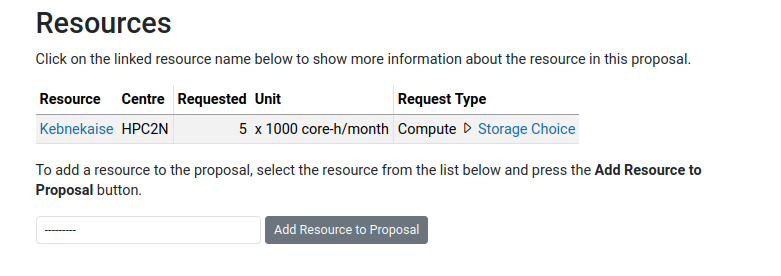
- NOTE that since a small amount of CPU hours (Kebnekaise resource) is added as default, you cannot pick it when you are adding resources. You should instead click the “Kebnekaise” resource that is already added and choose to edit it.
- More information and application here, at Local and Special Rounds.
NAISS resources
Small (NAISS resources)
- Max core hours/month/resource depends on the resource and can be seen on SUPR, for each resource’s round page. It is currently around 5000 core hours/month.
- Applications can be submitted at any time via the SUPR small project application page.
- Evaluation of applications are performed locally, approximately once a week.
- For small projects and new groups that want to gain experience in using HPC-systems
Medium (NAISS resources)
- Max core hours/month/resource depends on the resource and can be seen on SUPR, for each resource’s compute round page..
- Applications can be submitted at any time via the SUPR project allocation page.
- Evaluation of applications are performed locally and assesses the feasability of using the requested resources.
- Evaluations are handled monthly. Submission deadline for applications are the 15th of each month. If you sent in your application in time and have waited for more than a month on the evaluation, contact us through mail to support@hpc2n.umu.se.
Before filling out the form to apply for a medium level project, you should read the instructions.
Large (NAISS resources)
- Applications for more time than the maximum available for a medium project on the intended resource .
- Minor applications for supplementary resources can be included.
- Calls for applications for large level projects are issued by SNAC twice a year. There are instructions here and an applications form here (under NAISS Large Compute).
- Applications are evaluated by NAC and they also decide on the allocations, based on scientific merit, need for the resources, efficient use of the resources, and impact.
- Note that if a large level application is granted time, the PIs existing medium and small level projects will be terminated.
Before filling out the form to apply for a large level project, you should read the instructions.
You can read the (OLD) slides here from the seminar by Philipp Schlatter: “SNIC and SNAC: Handling of large-scale computer time allocations in Sweden.”. Note that some things have changed since then.
Make sure you have the following information handy before filling in the application form:
- your name and affiliation,
- which project you are taking part in.
Please, also read the
before you start applying for an account. Take a look at an overview of the available resources at HPC2N. Scroll down to “Local and Regional Resources”.
Storage projects
Warning
From 2026, the compute and storage projects will be merged, so this section will be obsolete and going away!
HPC2N has already moved to merged compute+storage rounds for 2026, so you find the updated information for Kebnekaise under “Local” projects on this page.
Project and account policies
- Each user should have one, and only one user account with HPC2N.
- Each user account may be added to as many projects as the user is participating in.
- A user should not have multiple user accounts for different projects.
- After the project has been approved and assigned a project ID, existing user accounts can be added to the project.
- If you do not yet have a user account, you may apply for a new one as described on the User Account page.
- Having a user account is now dependent on being a member or PI of a project.
- Projects CANNOT be extended any longer, but a new project application can be created based on the old project.
Adding users to existing projects
All user administration for all types of projects are handled by the PI (or the appointed proxy-PI) in SUPR. The users must first have an account in SUPR and have signed the NAISS User agreement. Signing it can be done on the “Personal Information” page in SUPR.
Expiring projects
- When a project ends, all jobs that are already running will continue to run.
- If you have jobs still in the queue when your compute project expires, you need to either change the project to an active one as they will otherwise never start, or remove the jobs.
- You can use this command to move the jobs to the new project:
- Note that you cannot use the new project until the date it becomes active.
Project Information
Sometimes you need to obtain information about current (or past) projects running at HPC2N and their recent CPUhours usage.
We strongly recommend you to use SUPR for looking up allocation and resource usage. It is the most updated and correct version. However we also provide a command line program you can use called:
which allows users to list:
- project name, principal investigator (PI) and duration;
- allocation in CPUhours/month to a specific cluster and the recent fairshare usage;
- real usage in CPUhours;
- user accounts (and names) related to a project.
Note
Used CPUhours may differ if you look it up in SUPR compared to what you get from projinfo. Usually the numbers in SUPR are “more correct” than those you get when using projinfo. projinfo get its information from the batch system and does not take into account that different resources are charged differently, for instance GPU-resources on Kebnekaise.
Info
projinfo’s synopsis is as follows:
projinfo [-v] [-q] [-o] [-u user] [-p project] [-c cluster]
   -v : prints authorized users of a project
   -d : also print user usage per month
   -q : quiet, only print data (intended for script use)
   -o : print information about all (old) projects, not just current
   -u user : print information about specific user
   -p project : print information about specific project
   -c cluster : only print allocations on specific cluster
   -h : prints this help
Used time on the clusters are only available on the login node of the cluster.
Project should be specified as in the submit file
I.E. -p naissXXXX-YY-ZZ or hpc2nXXXX-YYY)
- If run without any option, projinfo lists all active projects for the current user.
- If -v option is specified, authorized user accounts will be listed along with the corresponding real names.
- Sometimes usage information is not available in the job scheduler, in which case you will see N/A for usage.
- Note that the real usage is approximate but gives a quick indication of the time used. However, the final scheduling priority is determined (among other things) by comparing recent fairshare usage with fairshare utilization target (displayed by projinfo in percent).
Example
The following example lists information for an example project SNIC2020-5-28:
projinfo -p snic2020-5-28 -v
Information for project SNIC2020-5-28:
    PIs name: Project title
    Active from 20200901 to 20210831
Allocations:
    kebnekaise:       5000 CPUhours/month, used 109.2% the past 30 days
    kebnekaise-lm:     500 CPUhours/month, used 94.2% the past 30 days
Usage on kebnekaise
    2020 Sep:   5046 CPUhours
Authorised users:
    user1   User’s real name
    user2   User’s real name
Questions?
If you have any questions about how to apply for a project, add users, etc., contact us through the support form on SUPR or mail them to: support@hpc2n.umu.se.